How to check recoverability of deleted file or folder?
Problem:
I need to recover particular file that has been accidentally deleted. I downloaded Active@ UNERASER for DOS Demo version and found this file in the list of deleted files. I've saved some information to the drive where deleted file is located, so I'm not sure if this file could be recovered or not, do I need to purchase commercial version of Active@ UNERASER for DOS to recover it or it's no use because file becomes not recoverable.
Solution
Boot in DOS mode and run Active@ UNERASER
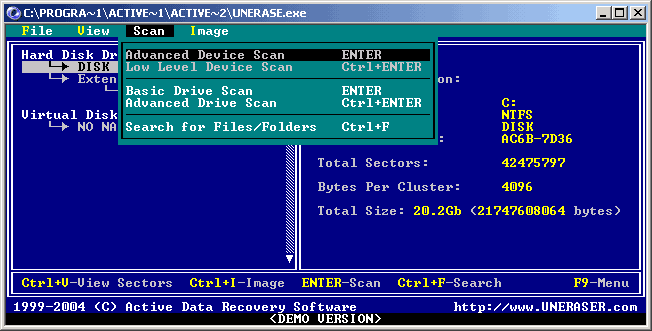
Select drive containing deleted file
and scan it by pressing [ENTER]
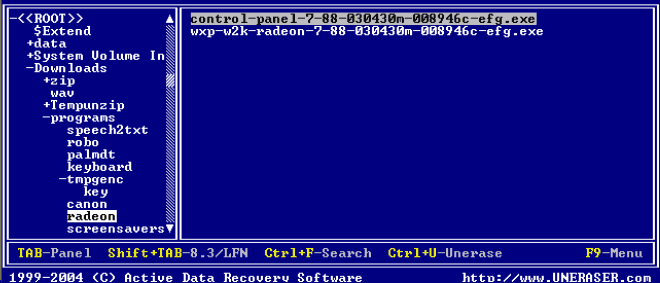
(Optionally) You can switch to long filenames view by pressing [SHIFT]+[TAB] key br />
Find and position the cursor on your deleted file/folder. Deleted files/folders are marked grey
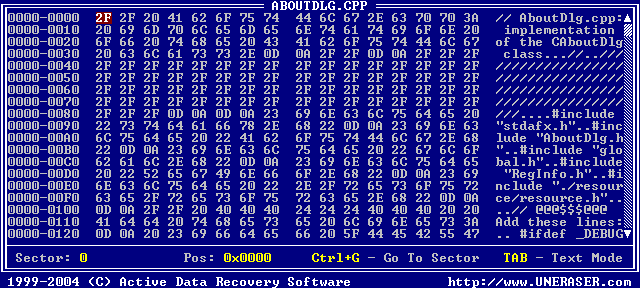
If file is recoverable - you can see its content in Disk Viewer and evaluate its safety. If file is not recoverable - an error message will appear
You can check folder's recoverability the same way - if you try to open the folder by pressing [ENTER]. If folder is not recoverable - error message appears, if recoverable - you'll see files and subfolders inside
All recoverable files located in the deleted folder will be recovered to the new location and subfolders will be recovered recursively.
Folder becomes not recoverable in case when its header is overwritten or damaged. Usually it happens when you write something onto the drive where deleted file is located.
DO NOT WRITE ANYTHING ONTO THE DRIVE CONTAINING YOUR IMPORTANT DATA THAT YOU HAVE JUST DELETED ACCIDENTALLY!
Even data recovery software installation to the same drive could spoil your sensitive data. Download and save Active@ UNERASER for DOS onto the bootable floppy and boot from it! DO NOT SAVE ONTO THE SAME DRIVE DATA THAT YOU FOUND AND TRYING TO RECOVER!
While saving recovered file or folder onto the same drive where they are located, you can intrude in process of recovering by overwriting table records for this and other deleted entries. It's better to save data onto another logical, removable, network or floppy drive.